
Kululu Review (2026): Is It Worth It?
Have you ever hosted a wedding, birthday party, corporate event, or family gathering and later realized that everyone had amazing photos—but you never got to see most of them?
Some guests upload pictures on WhatsApp, some share them on Instagram, while others simply forget to send them. As a result, many special memories are scattered across different phones and apps.
That’s where Kululu comes in.
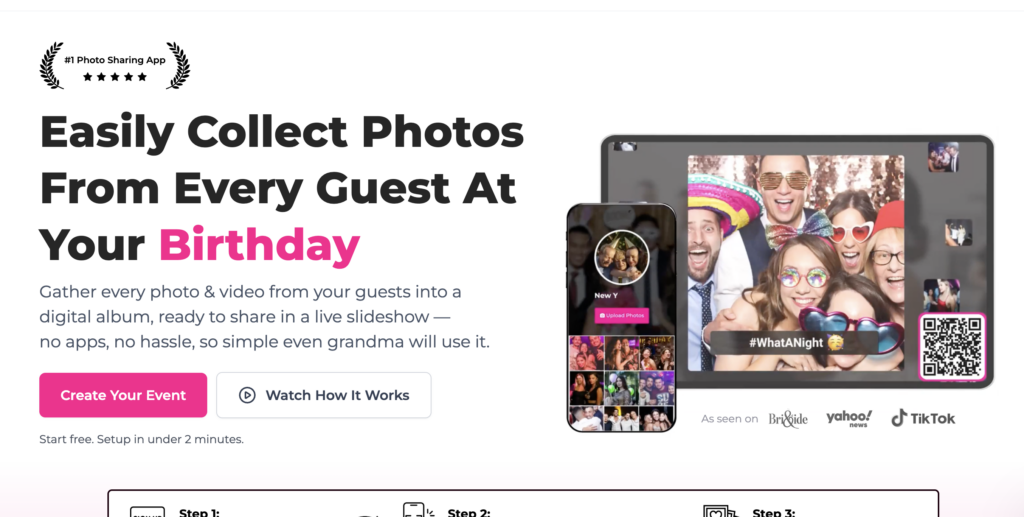
Kululu is an event photo-sharing platform that makes it incredibly easy to collect photos and videos from all your guests in one organized album. Instead of asking everyone to email their pictures or upload them to cloud storage, guests simply scan a QR code and upload their media directly through their browser—no app download required.
Whether you’re planning a wedding, birthday party, school event, conference, or family reunion, Kululu aims to make collecting memories effortless.
In this review, we’ll explore its features, pricing, pros and cons, real-world use cases, and how it compares to other popular event photo-sharing platforms.
Quick Verdict
| Category | Rating |
|---|---|
| Ease of Use | ⭐⭐⭐⭐⭐ |
| Features | ⭐⭐⭐⭐⭐ |
| User Experience | ⭐⭐⭐⭐⭐ |
| Customization | ⭐⭐⭐⭐☆ |
| Pricing | ⭐⭐⭐⭐☆ |
| Customer Support | ⭐⭐⭐⭐⭐ |
| Overall Rating | 9.6/10 |
Pros
- No app installation required
- Guests can upload using a QR code
- Supports both photos and videos
- Beautiful and user-friendly interface
- Great for weddings, parties, and business events
- Live photo wall feature
- Private event albums
- Easy setup
Cons
- Internet connection is required
- Some advanced features are available only on paid plans
- Not intended for professional photo editing or permanent cloud storage
What is Kululu?
Kululu is an online event photo-sharing platform that allows guests to upload photos and videos into a shared digital album.
Instead of creating complicated cloud folders or collecting media manually after an event, Kululu provides a simple QR code that guests can scan to instantly upload their memories.
One of the biggest advantages is that guests don’t need to install an app or create an account. Everything works directly from a web browser, making it accessible for people of all ages.
The platform is commonly used for:
- Weddings
- Birthday parties
- Baby showers
- Corporate events
- School functions
- College festivals
- Conferences
- Family reunions
- Charity events
- Product launches
- Community gatherings
Its primary goal is simple: make collecting event memories fast, easy, and organized.
How Does Kululu Work?
Kululu has designed the process to be as simple as possible.
Step 1: Create Your Event
After signing up, create a new event by adding details such as:
- Event name
- Date
- Cover image
- Event description
The setup only takes a few minutes.
Step 2: Receive Your QR Code
Once your event is ready, Kululu generates a unique QR code and shareable link.
You can print the QR code on:
- Wedding invitations
- Table cards
- Welcome boards
- Event banners
- Digital screens
This QR code becomes the gateway for guests to upload their photos.
Step 3: Guests Upload Their Photos
Guests simply:
- Scan the QR code
- Select their photos or videos
- Upload them
No downloads.
No registration.
No complicated instructions.
Step 4: Enjoy All the Memories
Uploaded photos appear inside your shared event album, making it easy to relive the event from everyone’s perspective.
Key Features of Kululu
1. QR Code Photo Sharing
This is Kululu’s biggest strength.
Instead of asking guests to send photos later, they can upload everything immediately by scanning a QR code.
This dramatically increases participation because everyone already knows how to use a phone camera to scan a QR code.
Best For
- Weddings
- Parties
- Conferences
- School functions
- Family events
2. No App Required
Many event-sharing platforms require guests to download an app.
Kululu eliminates this extra step.
Guests can upload directly from their browser, making the process much faster and easier.
This also helps less tech-savvy guests participate without confusion.
3. Shared Digital Album
Every uploaded photo and video is collected into one organized album.
Instead of searching through WhatsApp chats, Google Drive folders, or email attachments, everything stays in one place.
This saves a lot of time after the event.
4. Video Upload Support
Photos capture moments.
Videos capture emotions.
Kululu supports both, allowing guests to upload short videos along with their photos.
This creates a richer collection of memories that includes speeches, dances, celebrations, and candid moments.
5. Live Photo Wall
One of Kululu’s most exciting features is the live photo wall.
As guests upload photos during the event, they can be displayed on a TV or projector in real time.
Imagine guests taking pictures during a wedding reception and seeing them appear instantly on a large screen. It creates an interactive experience and encourages even more people to contribute.
6. Event Customization
Kululu allows organizers to personalize their event page with details such as:
- Event name
- Cover photo
- Theme
- Welcome message
This gives your shared album a polished and professional appearance.
7. Privacy Controls
Not every event should be public.
Kululu offers privacy options so your event album is shared only with the people you invite.
This makes it suitable for private family events as well as professional corporate gatherings.
Real-Life Example
Imagine you’re hosting a wedding with 250 guests.
A professional photographer captures beautiful moments, but guests also take hundreds of candid pictures throughout the day.
Without Kululu:
- Some guests forget to send photos.
- Others post only on social media.
- Many images remain on personal phones forever.
With Kululu:
Every guest scans a QR code at the venue and uploads their photos instantly.
By the end of the event, you have one complete album containing hundreds of unique moments from different perspectives.
Who Should Use Kululu?
Kululu is an excellent choice for anyone organizing an event where multiple people will be taking photos.
It works particularly well for:
Weddings
Collect candid moments from every guest.
Birthday Parties
Save fun memories without asking everyone to send photos later.
Corporate Events
Encourage attendees to share event highlights in one organized gallery.
Schools and Colleges
Perfect for annual functions, sports days, graduations, and cultural festivals.
Family Gatherings
Bring everyone’s memories together into a single album.
Kululu Pricing
Kululu offers multiple pricing plans depending on the size and requirements of your event.
While plans may change over time, they generally include:
| Plan | Suitable For |
|---|---|
| Free | Small events or trying the platform |
| Paid Plans | Weddings, large parties, conferences, and businesses requiring additional features |
As pricing and features can change, it’s always a good idea to check the latest plans on Kululu’s official website before making a purchase.
🎉 Ready to Capture Every Moment?
If you’re planning a wedding, birthday, corporate event, or any special occasion, Kululu makes collecting photos incredibly simple.
You can set up your event in just a few minutes and start collecting memories from every guest.
Kululu Pros & Cons
Like every platform, Kululu has its strengths and a few limitations. Here’s a quick overview:
| Pros | Cons |
|---|---|
| Extremely easy to use | Requires an internet connection for uploads |
| No app download needed | Free plan has limitations |
| QR code makes photo sharing effortless | Advanced customization may require a paid plan |
| Supports both photos and videos | Not designed for professional photo editing |
| Great for weddings, parties, and business events | |
| Live Photo Wall for real-time engagement | |
| Private event albums | |
| Browser-based access works on most devices |
What We Loved
After reviewing Kululu, these are the features that impressed us the most:
1. No App Installation
One of the biggest reasons guests don’t upload event photos is because they don’t want another app on their phone.
Kululu removes this barrier completely. Guests simply scan a QR code and upload directly from their browser.
This alone can significantly improve participation.
2. Simple Setup
Creating an event takes only a few minutes.
You don’t need any technical knowledge, making it suitable even for first-time users.
3. Beautiful User Experience
The interface feels clean, modern, and easy to navigate.
Everything from creating an event to managing uploads is straightforward.
4. Works for Almost Every Event
Whether you’re organizing a:
- Wedding
- Birthday
- Baby Shower
- School Event
- College Festival
- Conference
- Corporate Meet
- Charity Event
- Family Reunion
Kululu adapts well to different types of events.
What Could Be Better
Although Kululu performs well overall, there are a few areas where improvements would make it even stronger.
More Customization
Some users may want additional branding options, custom themes, or deeper personalization for event pages.
More Integrations
Direct integrations with popular event management tools, CRMs, or cloud storage platforms could further enhance the workflow for business users.
Offline Upload Option
An offline upload feature that syncs later (once an internet connection is available) could be useful for venues with poor connectivity.
Kululu vs Competitors
There are several platforms that offer event photo sharing, but each has a different approach.
Here’s how Kululu compares with some of the most popular alternatives.
| Feature | Kululu | Google Photos | Dropbox | Guestpix | WedUploader |
|---|---|---|---|---|---|
| QR Code Sharing | ✅ | Limited | ❌ | ✅ | ✅ |
| No App Required | ✅ | ❌ | ❌ | ✅ | ✅ |
| Photo Upload | ✅ | ✅ | ✅ | ✅ | ✅ |
| Video Upload | ✅ | ✅ | ✅ | ✅ | ✅ |
| Event Focused | ✅ | ❌ | ❌ | ✅ | ✅ |
| Live Photo Wall | ✅ | ❌ | ❌ | Available on supported plans | Varies |
| Easy for Guests | ⭐⭐⭐⭐⭐ | ⭐⭐⭐ | ⭐⭐ | ⭐⭐⭐⭐ | ⭐⭐⭐⭐ |
Kululu vs Google Photos
Google Photos is an excellent cloud photo storage service, but it isn’t specifically designed for events.
Guests typically need a Google account, and sharing albums can be less intuitive for one-time event participants.
Kululu focuses on simplicity with QR code uploads, making it a better choice for weddings, parties, and conferences.
Winner: Kululu for event-specific photo collection.
Kululu vs Dropbox
Dropbox excels at file storage and collaboration but isn’t optimized for collecting photos from dozens or hundreds of event guests.
Kululu offers a much smoother experience for attendees who simply want to upload photos without navigating folders or accounts.
Winner: Kululu for event photo sharing.
Kululu vs Guestpix
Guestpix is another dedicated event photo-sharing platform with QR code functionality and event-focused features.
If you’re comparing the two, consider factors such as pricing, desired customization, live display features, and the overall user experience that best fits your event.
Winner: Depends on your feature needs and budget.
Kululu vs WedUploader
WedUploader is especially popular for weddings.
If your only goal is collecting wedding photos, it’s worth comparing both platforms.
Kululu stands out for its clean interface, ease of use, and support for a variety of event types beyond weddings.
Winner: Kululu for versatility.
Who Should Use Kululu?
Kululu is a great fit for:
- Couples planning their wedding
- Wedding planners
- Event organizers
- Birthday party hosts
- Schools and colleges
- Corporate event managers
- Conference organizers
- NGOs
- Community organizations
- Sports clubs
- Families hosting reunions
- Anyone wanting to collect guest photos without technical hassle
Who Should Skip Kululu?
Kululu may not be the ideal choice if you:
- Need advanced photo editing tools.
- Want long-term cloud storage for personal files.
- Are looking for a complete digital asset management solution for photographers or businesses.
In those cases, a dedicated cloud storage or photo management platform may be more suitable.
Frequently Asked Questions (FAQs)
Is Kululu free?
Kululu offers a free option for users who want to try the platform. Paid plans provide additional features and capabilities.
Do guests need to install an app?
No. Guests can upload photos and videos directly through their web browser.
Can guests upload videos?
Yes. Kululu supports both photo and video uploads.
Is Kululu only for weddings?
No. It’s suitable for birthdays, conferences, corporate events, school functions, reunions, and many other occasions.
Can I use Kululu for business events?
Yes. It’s a practical way to collect photos from conferences, networking events, and company gatherings.
Is my event private?
Kululu provides privacy controls so albums are shared only with invited participants.
Can I download all the photos later?
Yes. Organizers can download the collected media after the event.
Does Kululu work on iPhone and Android?
Yes. Because it runs in a web browser, it works on most modern smartphones and tablets.
Is there a guest limit?
Check the current plan details on the official Kululu website, as limits and features may vary by plan.
Is Kululu worth it?
For anyone organizing an event where guests will be taking photos, Kululu offers a simple and convenient way to collect everyone’s memories in one place.
Final Verdict
Planning an event involves countless details, and collecting photos afterward shouldn’t be another challenge.
Kululu simplifies the entire process by allowing guests to upload their photos and videos through a simple QR code. There are no complicated setups, no mandatory app downloads, and no confusing sharing permissions.
Its intuitive design, event-focused features, and ease of use make it a strong choice for weddings, birthday parties, school events, corporate gatherings, and many other occasions.
While it may not replace professional cloud storage or photo editing software, it excels at what it was designed to do: bringing all your event memories together in one organized album.
If you’re looking for an easy way to collect photos from your guests without technical headaches, Kululu is definitely worth considering.
Our Rating
⭐⭐⭐⭐⭐ 4.8/5
Ease of Use: ⭐⭐⭐⭐⭐
Features: ⭐⭐⭐⭐⭐
User Experience: ⭐⭐⭐⭐⭐
Value for Money: ⭐⭐⭐⭐☆
Customer Support: ⭐⭐⭐⭐☆
Overall Recommendation: Highly Recommended
Ready to Try Kululu?
If you’re planning a wedding, birthday, corporate event, school function, or family gathering, Kululu makes it incredibly easy to collect memories from everyone attending.
👉 Start Your Event Today
Whether you’re hosting 20 guests or 500, Kululu helps ensure that no special moment is left behind.