
HOSTING MADE SIMPLE
Your work is ready.
Let’s get it online.
A simple guide to Tiiny Host: what it does well, what to watch out for, and which plan makes sense.
Article date:
Fact-check and screenshots: 15 September 2026
Affiliate disclosure: This article contains affiliate links. If you purchase through them, I may earn a commission at no extra cost to you.
You have a portfolio, a PDF, or a small website ready to share. Now you need a link that other people can open. That last step can feel more complicated than creating the content itself.
Tiiny Host is worth considering when you want to turn a finished file or simple website into a shareable web page with minimal setup. Its appeal is easy to understand: spend less time dealing with hosting and more time getting your work in front of people.
This Tiiny Host review explains the features, pricing, free-plan limits, and practical trade-offs in plain English.
Review approach: This is a research-based assessment of Tiiny Host’s public website, pricing page, and help documentation. It does not claim paid-account testing, measured loading speeds, or independently verified uptime.
Tiiny Host review: the quick verdict
My recommendation: Start with the free plan using a small, public sample of your work. Upgrade when a specific requirement—such as a custom domain or a larger upload—justifies the cost.
Best fit: Portfolios, document sharing, simple landing pages, and client previews.
Main limitation: It does not host a working WordPress installation.
What is Tiiny Host?
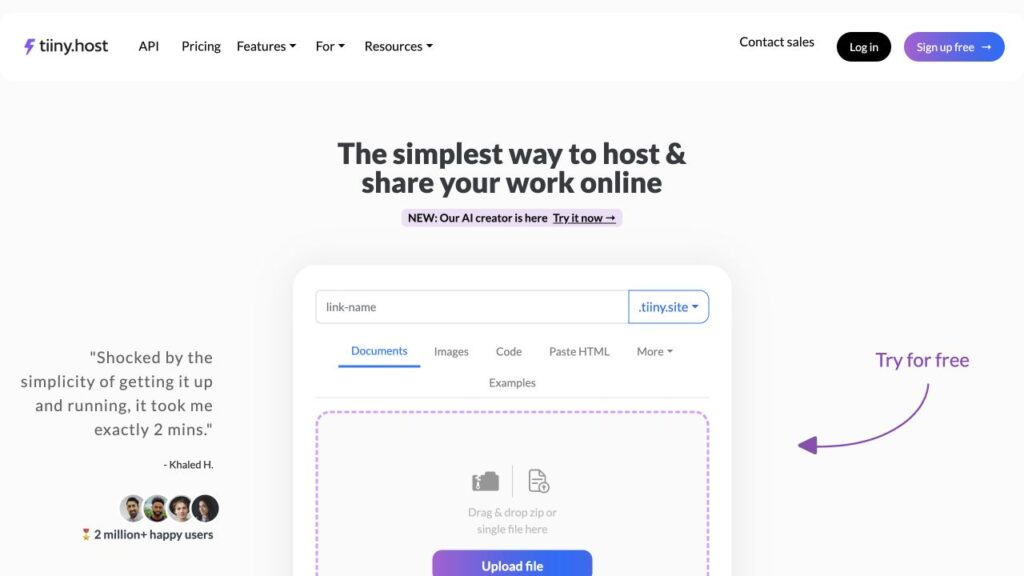
Tiiny Host is an online publishing and hosting service for files and web projects. Its public upload interface lets you choose a link name and upload content. It supports HTML, ZIP files, PDFs, and other document and image formats.
For websites, its core use case is a static website: pages made from files such as HTML, CSS, JavaScript, and images. Think of a portfolio or a simple product page.
You can also share a document without building a website around it. That makes the service relevant to people who simply need a resume, catalogue, or presentation available at a web address. Source: Tiiny Host overview.
The features that matter in everyday use
1. A straightforward route from file to link
The upload-first interface is the strongest reason to consider Tiiny Host. If you already have your content, it gives you an obvious place to start. For an occasional project, avoiding a long setup process can be more valuable than having dozens of settings.
2. A custom address for professional projects
Custom domains are available on Solo and above. For a portfolio or client-facing page, your own address can make the link easier to recognise. Tiiny Host also lists SSL support, which provides an HTTPS connection. Source: plan features.
3. Editing without rebuilding your workflow
Tiiny Host documents browser-based code and visual editing, plus AI-assisted changes. Its developer page says updates can keep the same URL. That is useful when a client already has your link and asks you to change a heading or replace an image. Editing access depends on the plan. Source: editing and publishing features.
4. Tools for sharing and feedback
Paid options include analytics and QR codes, with password protection on Solo and above. Pro adds email capture and team features. Choose these around a real task: tracking interest in a brochure, sharing a preview, or working with colleagues. Source: pricing comparison.
Practical example: A freelance designer could publish a small portfolio and share the link in a proposal. A café could share a menu PDF. A teacher could publish a public revision guide. These are suggested uses, not projects tested for this review.
Tiiny Host pricing: what should you pay for?
Tiiny Host offers Free, Tiny, Solo, Pro, and Pro Max plans. The table below helps you choose by need. Check the live pricing page for current allowances before buying.
| Plan | Most useful for | Key distinction |
|---|---|---|
| Free | Trying a small project | 1 active project; 3 MB uploads, with a separate 0.5 MB PDF limit; 5,000 visits/month. |
| Tiny | One polished public link | 1 project, 25 MB uploads, analytics, QR codes, and removal of Tiiny Host branding. |
| Solo | A branded portfolio or small project collection | 5 projects, 75 MB uploads, custom domains, editing, and password protection. |
| Pro | Freelancers or teams managing more work | 15 projects, email capture, team members, and priority support. |
| Pro Max | Larger collections or files | Advertised unlimited active projects and a 2 TB account limit. Other limits still need checking. |
Plan details: Tiiny Host’s official comparison, checked 15 September 2026.
How much does it cost? The official help article lists US monthly prices of $9 for Tiny, $18 for Solo, $38 for Pro, and $89 for Pro Max. Local pricing can differ. Annual plans are paid upfront; a displayed “per month” annual equivalent does not mean monthly billing. The help article’s Solo annual figures appear inconsistent, so confirm that total at checkout. Source: pricing help article.
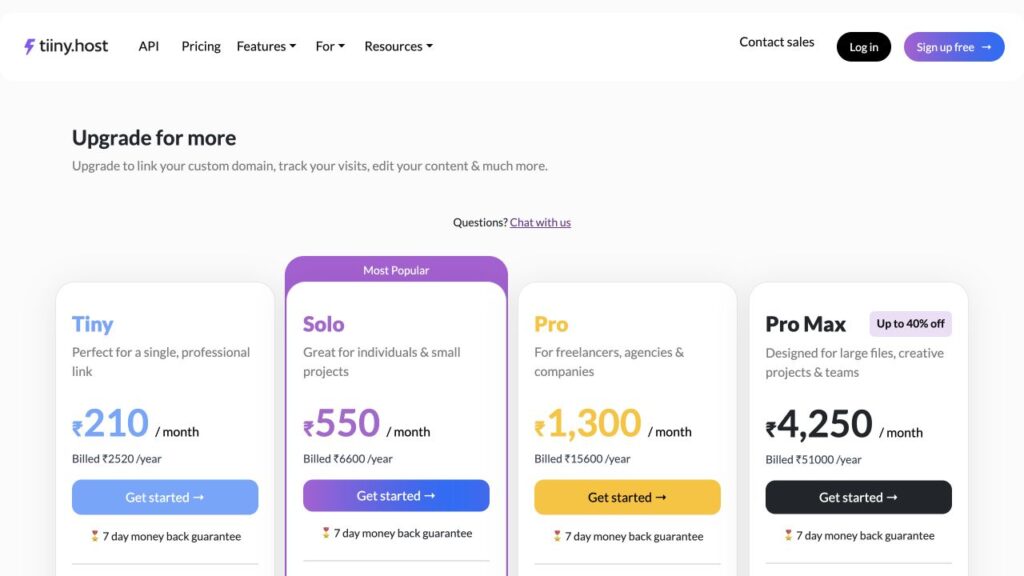
My take: Tiny makes sense when your only goal is one public link with a cleaner presentation. If you need your own domain, compare Solo first. Choose Pro because you need its project capacity or collaboration features, rather than simply because it sounds more professional.
How to get started with Tiiny Host
- Prepare a small sample. Use a public PDF or a simple page. For a static website, include its required images and other files in the upload package.
- Open Tiiny Host. Choose a clear, readable link name and use the upload area.
- Follow the prompts. Complete any account or verification steps shown, then finish publishing.
- Check the result. Open the live link on your phone and in a private browser window. Test images, navigation, and any buttons.
- Upgrade if needed. Check your file size and the features you actually need before selecting a paid plan.
Before sharing widely: Send the link to yourself through the same channel your audience will use. A page that opens on your laptop should also be checked on mobile and through your intended email or social app.
Tiiny Host pros and cons
| What I like | What to consider |
|---|---|
| A focused upload interface with a clear starting point. | The free upload allowance is small, especially for PDFs. |
| Useful for both finished documents and simple websites. | A working WordPress site requires different hosting. |
| Paid plans offer a path to branded sharing and collaboration. | Custom domains and privacy features require a higher tier than Tiny. |
| A free plan lets you assess the basic fit. | Free accounts require activity to keep links online. |
Tiiny Host’s FAQ says free links remain online if you log in at least once every three months. It also says uploads are publicly accessible unless you apply access restrictions. Source: official FAQ.
One sharing issue worth knowing: Tiiny Host acknowledges that some networks and security tools block its shared .tiiny.site domain because of past spam on that domain. Its help guide recommends a custom domain and describes a paid-account alternative available through support. That makes checking your actual sharing route worthwhile. Source: link-access troubleshooting.
Who should use Tiiny Host?
Put it on your shortlist if: your content is ready, your site is relatively simple, and your main goal is making it accessible through a link.
| Your situation | My recommendation |
|---|---|
| A public resume, short guide, or compact portfolio | Try a small file on Free first. |
| A branded business page or client preview | Compare Solo against your domain and privacy requirements. |
| Several client projects managed by a team | Assess Pro’s capacity and team features. |
| A blog that needs WordPress plugins and a dashboard | Choose hosting that explicitly supports WordPress. |
| An application with a database or server-side services | Verify every backend requirement before choosing a host. |
Tiiny Host’s FAQ does list PHP support, so describing it as “HTML only” would be inaccurate. However, PHP support does not mean every application will run unchanged. A static export of a WordPress site is also different from running WordPress itself. Source: supported platforms FAQ.
Frequently asked questions
Is Tiiny Host free?
Yes. There is a free plan for a small project. Check the file-size allowance first, especially if you are uploading a PDF, and remember the account-activity requirement described above.
Can I use my own domain?
Yes, on Solo and above. Include the domain’s purchase or renewal cost in your overall budget rather than assuming it is included in hosting.
Can Tiiny Host host my WordPress blog?
It does not support a working WordPress installation. You can publish a compatible static export, but it will not preserve the full WordPress dashboard and plugin behaviour.
Will Tiiny Host make my website rank on Google?
Hosting alone does not guarantee rankings. Your content still needs to answer useful questions, and the pages need readable structure, meaningful titles, and working navigation. A simple publishing process is helpful, but it is not an SEO strategy by itself.
Is it suitable for private files?
Do not treat an obscure link as privacy. Use the appropriate access controls and check their suitability before uploading private material. Password protection is available on Solo and above.
Is there a refund period?
Tiiny Host advertises a seven-day money-back guarantee for paid plans. Read the current conditions before subscribing. Source: billing overview.
Final recommendation: is Tiiny Host worth it?
Tiiny Host is worth trying if your biggest problem is getting a finished file or simple website online without much setup. Its value is clearest for small publishing jobs: a portfolio, a document, a landing page, or a preview someone needs to open today.
My advice is to make the decision practical. Upload a small sample, open it as a visitor, and see whether the result suits your audience. If it does, choose the lowest plan that covers your file size, domain, and access requirements.
Ready to give your work a link?
Start with a small project. Check how it looks, then decide whether you need more.