
Creating one marketing graphic is straightforward. Creating hundreds of similar graphics—with different headlines, product images, prices, or customer details—can become a time-consuming job.
For businesses that publish frequently, repetitive design work can slow down the entire content process. Someone has to open the design, replace the text, adjust the image, check the layout, export the file, and repeat.
Templated.io aims to simplify this process by combining reusable templates with automated image, PDF, and video generation.
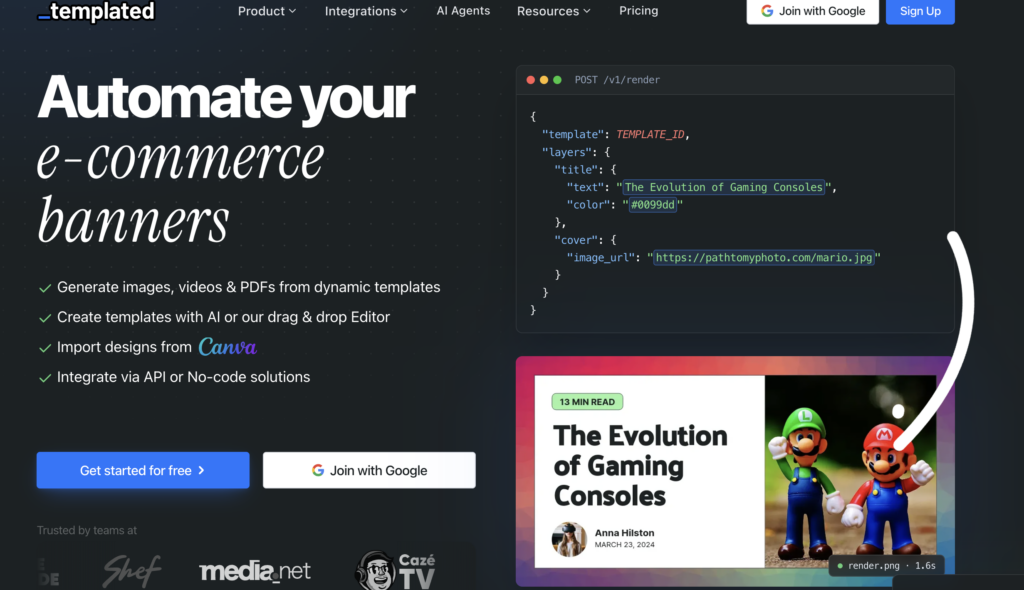
Instead of manually editing every asset, you create a base layout and supply the information that should change. Templated then generates variations using that structure.
But how useful is it in practice? Can beginners use it? What does it cost? And which businesses are most likely to benefit?
This detailed Templated.io review examines its documented features, technical approach, pricing, practical applications, strengths, and limitations.
Affiliate disclosure: This article contains affiliate links. If you subscribe through these links, we may earn a commission.
Editorial note: This review is based on Templated’s official product pages and documentation, researched on October 1, 2026. We have not independently benchmarked a paid account. Performance estimates are attributed to the vendor, and pricing may change.
Templated.io Review: Our Quick Verdict
Templated.io is worth considering if your business regularly produces multiple versions of the same type of visual content.
Its strongest use case is repeatable production: product graphics, article covers, promotional banners, personalized certificates, and other assets where the layout stays relatively consistent while the content changes.
The potential benefit is easy to understand. Once you approve a template, you can concentrate on supplying accurate information instead of rebuilding the same composition repeatedly.
However, the value depends on your workload.
If you create only a few graphics each month, the subscription and setup effort may be difficult to justify. If every project requires a completely different creative direction, you may get less benefit from template automation.
Our assessment is that Templated deserves a place on the shortlist for businesses with recurring content-production needs. The best purchase decision comes from testing it with your actual data and measuring how much manual work remains.
What Is Templated.io?
Templated.io is a cloud platform that generates visual assets from dynamic templates.
A template contains your base design: text areas, images, logos, backgrounds, and other elements. When you generate an asset, you provide new values for the elements that should change.
According to its official website, the platform includes:
- A drag-and-drop visual editor.
- A gallery of ready-made templates.
- AI-assisted template generation.
- Canva design importing.
- Image, PDF, and video generation.
- API and no-code integration options.
Imagine a product-promotion graphic containing a company logo, product photograph, product name, and price.
The composition can remain consistent while the product information changes for each item. That makes the same design structure useful across an entire catalog.
This separation between layout and content is the foundation of the platform.
A designer can focus on the composition. A marketer can approve the messaging. A spreadsheet or application can supply the changing information.
How Does Templated.io Work?
A typical workflow has four stages.
Step 1: Create Your Base Template
Start by designing a layout or adapting an existing template.
Decide where the main heading, image, logo, supporting text, and call to action should appear.
At this stage, think beyond one sample asset. The template needs to work with different content lengths and image shapes.
Step 2: Identify the Elements That Will Change
Some elements may stay consistent across every output, such as your brand logo or background.
Other elements need to change, such as:
- Product names.
- Article titles.
- Prices.
- Customer names.
- Product photographs.
- Event dates.
- Promotional messages.
Clear names for these elements make the automation easier to maintain.
Step 3: Connect Your Data
Supply the changing values through a spreadsheet, connected workflow, or application.
Each record should contain the information required to generate one asset.
For example, one row might represent one product promotion, while another row represents a different product using the same layout.
Step 4: Generate and Review the Results
Generate your assets, inspect them, and move the approved files into your publishing process.
The design work happens mainly at the beginning. Ongoing work shifts toward keeping the source data accurate and checking exceptions.
That distinction matters: automation reduces repetition, but reliable output still depends on a well-designed template and clean input.
Templated.io Features Explained
1. Drag-and-Drop Template Editor
Templated’s image automation page describes a real-time canvas editor, ready-made templates, and editable imported designs.
A visual editor makes the product more approachable for people who want to control the design without building layouts through code.
However, the important question is how well the template handles real content.
A layout that looks attractive with a short example headline may struggle with a much longer product name. An image area designed around a square photograph may crop a portrait photograph poorly.
Before using a template for a large batch, test:
- Short and long headlines.
- Images with different proportions.
- Logos with different shapes.
- Missing or optional text.
- Content that spans several lines.
A simple template that consistently produces usable results can be more valuable than a complicated design that needs frequent correction.
2. Automated Image Generation
Automated image generation is one of Templated’s clearest applications.
Its official product page positions the feature for banners, social media content, advertising creatives, and other marketing visuals.
Potential applications include:
- Product promotions.
- Blog featured images.
- Quote graphics.
- Event announcements.
- Branded comparison images.
- Promotional banners.
For marketing teams, the main advantage is reducing the work required to produce controlled variations.
For example, you could create several versions of a promotion using different headlines while preserving the same brand layout.
This can make creative testing easier to organize. However, producing more graphics does not automatically improve advertising results.
Campaign performance still depends on the offer, audience, message, placement, and landing page. Templated supports production; your campaign data determines which variations work.
3. Bulk Generation from CSV and Excel
The spreadsheet integration supports CSV and Excel uploads, column mapping, previews, and ZIP downloads for generated images.
This is a practical entry point for businesses that already organize their content in spreadsheets.
A product dataset could look like this:
| Spreadsheet field | Purpose |
|---|---|
| Product name | Main heading |
| Approved benefit | Supporting text |
| Current price | Price display |
| Product image URL | Product photograph |
| Brand logo URL | Brand identification |
| Internal record ID | Match the output to its source |
The main advantage is that content can be prepared and checked before generation.
For occasional campaigns, uploading a spreadsheet may be sufficient. For an ongoing publishing pipeline, a connected automation workflow may be more useful.
The quality of the input remains important. Outdated prices, incorrect image references, or inconsistent naming can create a large batch of incorrect assets.
Review the source data before scaling the output.
4. PDF Generation
Templated’s PDF generator uses templates and data to generate documents. The official page highlights applications such as invoices and shipping labels.
The strongest potential use cases are documents with a consistent visual structure, including:
- Personalized certificates.
- Branded summaries.
- Promotional documents.
- Straightforward invoices.
- Business forms.
For an invoice workflow, calculations, numbering, and payment records should come from the system responsible for those values. Templated can then receive the approved information for presentation.
More complex documents need a careful trial.
Long paragraphs, variable tables, changing page counts, and different language scripts can introduce requirements that are harder to standardize.
If you need elaborate reports, test the most demanding example first. Inspect the exported file for readability, printing behavior, and text selection where those features matter.
5. Short-Video Automation
Templated also offers video automation, including dynamic templates, animations, transitions, and video layers.
Its product page advertises limits of up to 90 seconds and 60 frames per second.
Short, repeatable videos are the most natural starting point.
Examples include:
- Product announcements.
- Event reminders.
- Promotional clips.
- Branded social videos.
- Product showcases.
A video with a product image, headline, price, and animated call to action can be easier to standardize than a complex narrative production.
Before committing to a video workflow, generate one complete example using your actual content.
Check animation timing, text readability on a phone, image cropping, and any audio requirements. This review does not establish support for every advanced editing or audio feature.
6. AI Template Generator
Templated’s AI template generator creates editable template structures from prompts. It also advertises converting uploaded designs into reusable templates with layers and placeholders.
This can help users get past the blank-canvas stage.
For example, a prompt could be:
Create a square promotion template for a software product. Include a product image, logo, headline, three short benefits, and a call-to-action area. Use generous spacing and make each content element separately editable.
The important benefit is what happens after the initial generation: the design becomes a structure that can be adjusted and reused.
Treat AI output as a starting point.
Review contrast, spacing, visual hierarchy, brand consistency, and how the layout behaves with different content lengths.
AI may reduce the time needed to create an initial composition, but someone still needs to approve the design and message.
7. No-Code Automation
Templated provides routes for users who want automation without developing a custom application.
Its Make integration supports mapping data into templates and generating assets within connected workflows.
A proposed publishing process could:
- Read an approved record from a spreadsheet.
- Send the content to the selected template.
- Generate the graphic.
- Save the output URL in the source record.
- Pass the approved asset to a publishing tool.
The exact implementation depends on the connected applications.
For beginners, the work shifts from writing code to understanding triggers, fields, and error handling.
You still need to decide what starts the process, which template receives the data, and what happens when required information is missing.
A visible status field—such as “Ready,” “Generated,” or “Needs correction”—can make the workflow easier to monitor.
Also consider the cost of external automation tools when calculating your total monthly spend.
8. Webhook Integration
The webhook integration supports generating assets from incoming data, mapping JSON fields to template layers, and returning a generated asset URL.
This can be useful for event-driven workflows.
For example, a form submission could provide the information for a personalized certificate or confirmation graphic.
The practical benefit is that generation can become part of an existing business process.
For a dependable setup, define which incoming fields are required and how incomplete submissions should be handled.
9. MCP Integration for AI-Assisted Workflows
Templated’s MCP documentation describes connecting compatible AI assistants to generate assets, edit templates, and manage resources through conversational instructions.
This offers another way to interact with the platform.
A user could request a batch of graphics from a saved template instead of manually constructing every request.
Its usefulness depends on the connected assistant, authentication, and how clearly the request identifies the template and data.
Conversational access is most useful when the underlying process is already well defined. Accurate source information and approved templates remain essential.
10. Embedded Editor
The embedded editor can be placed inside a website or application. Its documentation describes configurable branding, permissions, starting modes, and notifications for saves or downloads.
This may be valuable for software businesses and agencies building customer-facing tools.
For example, an application could allow customers to personalize approved layouts without leaving the product.
The surrounding application still needs its own account management, user experience, and business logic.
Before implementation, consider how customer access, editing permissions, and saved assets should work.
For businesses that only need internal content production, the standard editor and bulk-generation workflow may be sufficient.
Templated.io API Review
For developers, Templated’s API separates the template design from the changing content.
The documented generation endpoint is:
POST https://api.templated.io/v1/renderA request identifies the template and supplies values for named layers.
Here is an illustrative payload:
{
  "template": "YOUR_TEMPLATE_ID",
  "format": "png",
  "layers": {
    "headline": {
      "text": "Create Branded Content Faster"
    },
    "supporting_text": {
      "text": "Explore a repeatable visual workflow"
    },
    "cta": {
      "text": "Learn More"
    }
  }
}
The layer names must match the layers in your own template.
The render documentation describes synchronous generation and asynchronous rendering with a completion webhook.
This approach allows designers to manage the composition while developers provide the changing values.
For production use, it is sensible to record the source record ID, template, generation result, output URL, and any failure.
That makes it easier to investigate incorrect assets and repeat failed jobs deliberately.
Authentication uses a bearer API key. The authentication documentation states that the key provides full account access, so it should remain in a trusted server or automation environment.
It is also useful to keep approved production templates separate from experimental changes. Editing a live template can affect future output even when the source data stays the same.
Templated.io Pricing
When researched, the official pricing page displayed the following monthly-equivalent rates with annual billing:
| Plan | Monthly equivalent with annual billing | Monthly credits | Templates | Team members |
|---|---|---|---|---|
| Starter | $29 | 1,000 | Up to 15 | 2 |
| Scale | $79 | 5,000 | Up to 100 | 5 |
| Enterprise | $179 | 25,000 | Unlimited | 20 |
The annual equivalents calculated from those rates are:
- Starter: $348 per year.
- Scale: $948 per year.
- Enterprise: $2,148 per year.
A monthly billing option is available, but the prices above refer specifically to annual billing.
The official pricing page also advertises a 50-credit trial without a credit card. The embedded editor is listed under Scale benefits.
Check the live pricing page before subscribing, particularly if you need a specific feature or billing arrangement.
How Render Credits Work
Credit consumption depends on the asset type.
The stated model is:
- Images: One credit per image.
- PDFs: One credit per page.
- Videos: Credits depend on resolution, frame rate, and duration.
This matters because “1,000 credits” does not mean 1,000 outputs for every workload.
For example:
| Illustrative workload | Credit requirement |
|---|---|
| 100 individual images | 100 credits |
| 100 five-page PDFs | 500 credits |
| 100 videos at 1920 × 1080, 30 FPS, and 10 seconds | 1,300 credits |
The video calculation uses the vendor’s documented example of 13 credits per video.
Include trial outputs and revisions when estimating usage. If you generate several versions before approving one final asset, your usable monthly capacity will be lower than a simple output count suggests.
Performance and Reliability
Templated’s render documentation describes typical synchronous generation around two seconds, with video taking longer.
These are vendor estimates, not independently measured results from this review.
Real-world performance should be evaluated using your actual templates, assets, and expected volume.
A graphic with readily available images may behave differently from a longer video or a workflow that retrieves multiple external resources.
Measure the complete turnaround time:
- Retrieving source data.
- Generating the file.
- Reviewing the output.
- Delivering it to the destination.
For larger workloads, build a process that can queue work and handle failures. A dependable workflow should remain understandable when an upstream service responds slowly or a source image is unavailable.
Storage and File Management
Templated’s custom-storage documentation supports AWS S3, Cloudflare R2, and other S3-compatible buckets on Scale and Enterprise.
It describes options for retaining a Templated copy or keeping the durable copy in your own bucket.
This can be useful for businesses that already have an asset-storage setup.
However, the documentation explains that certain preview and merge operations need readable bucket URLs.
Consider how the files will be accessed, particularly if your documents contain sensitive information.
For website assets, define where the final files will live and who will maintain the links. Storage planning is part of building a reliable publishing process.
Who Should Use Templated.io?
Affiliate Marketers
Affiliate marketers can potentially use repeatable layouts for approved partner promotions.
A spreadsheet could contain brand names, approved descriptions, offers, image references, and campaign identifiers.
From that data, a proposed workflow could generate:
- Article cover images.
- Product comparison graphics.
- Social media promotions.
- Offer announcements.
- Branded campaign visuals.
The advantage is faster production and a clearer connection between source information and published assets.
Keep affiliate destinations in the publishing platform or page where the image appears. A call to action displayed inside an image is visual text; it does not automatically make the image clickable.
Bloggers and Publishers
Publishers with a consistent visual style can evaluate Templated for featured images and social sharing graphics.
An article title, category, and image reference could become the changing inputs for a standard layout.
This can reduce repetitive preparation, particularly for sites that publish frequently.
Avoid relying on one composition indefinitely. A small set of approved layouts can preserve consistency while providing visual variety.
E-Commerce Businesses
Stores with a large number of products may benefit from structured product-image workflows.
The strongest potential fit is a catalog with consistent source data and similar promotional requirements.
Accurate prices, images, and descriptions are essential. Automating an unreliable product feed can multiply errors.
Agencies
Agencies can evaluate template automation for recurring client deliverables.
The potential benefit is consistency across repeated assets while keeping each client’s branding distinct.
Organized source records, approved layouts, and a clear review process become particularly valuable when several people work on production.
Developers and Software Businesses
Developers can evaluate the API for generating assets from application data.
Software businesses may also find the embedded editor relevant when customers need to customize approved templates.
The decision should depend on integration requirements, access control, volume, and the quality of the generated output.
Templated.io Pros and Cons
Pros
A clear purpose
The platform addresses a specific problem: producing many variations from reusable layouts.
Several ways to start
Spreadsheets, automation integrations, and the API provide different implementation routes.
Consistent presentation
Approved templates can help keep fonts, spacing, colors, and layout decisions consistent.
Useful separation of design and data
The composition can remain controlled while content values change.
Potential across several workflows
Recurring marketing graphics and personalized documents may both benefit from the same general approach.
Cons and Limitations
Setup requires effort
You still need to build a suitable template, prepare the data, and test difficult cases.
Repetition can become noticeable
Using the same composition too frequently may make content feel monotonous.
Exceptions need attention
Long titles, missing images, and outdated information can still require correction.
Credits need planning
Video and multipage documents consume credits differently from individual images.
Connected tools add cost and maintenance
The overall workflow may require additional subscriptions and ongoing monitoring.
Advanced requirements need direct testing
Complex documents, import fidelity, specialist video requirements, and high-volume behavior should be evaluated with representative examples.
Is Templated.io Worth the Money?
The answer depends on how much recurring work it removes.
A useful calculation is:
Monthly value = production time saved × value of that time − subscription and workflow costs.
Consider an illustrative example.
Producing 200 assets manually at five minutes each would require about 16.7 hours.
If an automated process reduced routine handling to one minute per asset, it would save about 13.3 hours before accounting for setup and exceptional corrections.
This is a hypothetical calculation, not a measured Templated result.
Its purpose is to make the decision concrete.
If generated assets still need extensive redesign, the expected saving may be small. If the layout is stable and most outputs need little intervention, the economics can be more attractive.
Measure those numbers during the trial rather than assuming the software will save a particular amount of time.
How to Evaluate Templated Before Subscribing
The best trial starts with one recurring task.
- Choose an asset you already create regularly.
- Build or adapt a template using your own branding.
- Prepare representative records, including difficult examples.
- Generate the assets and inspect them at their intended viewing size.
- Record time spent, corrections, and credit usage.
- Connect the output to your actual publishing process.
- Compare the complete workflow with your current method.
The important result is usable output with less recurring effort.
An attractive demo is encouraging, but your own content provides stronger evidence of whether the product fits your business.
Frequently Asked Questions
What is Templated.io used for?
Templated.io generates visual assets from reusable templates and changing data. Its documented offering includes images, PDFs, and short videos.
Can I use Templated without coding?
Yes, the documented spreadsheet workflow provides a no-code route through file uploads and field mapping. Connected automation workflows offer another approach, although they still require configuration.
Can Templated generate images in bulk?
Its spreadsheet integration supports CSV and Excel uploads, column mapping, and batch generation. This is useful when your content is already organized as structured records.
Can I import Canva designs?
Templated advertises Canva importing. Test your specific design and check the converted fonts, effects, spacing, and editable elements. Import fidelity has not been independently verified in this review.
Does Templated generate videos?
The official video offering supports template-based generation, animations, transitions, and video layers. It advertises limits of up to 90 seconds and 60 FPS.
Does Templated offer a free trial?
The pricing page advertised a 50-credit trial without a credit card when researched. Check the current terms before signing up.
Which Templated plan should I choose?
Start by estimating credit usage, template count, team access, and required features. Use a representative trial batch to confirm your assumptions before choosing a subscription.
Can Templated improve my advertising results?
It can potentially make producing and testing creative variations more efficient. It does not guarantee higher conversions, more sales, or better advertising returns.
Is Templated suitable for occasional design work?
It may be harder to justify when you produce only a few assets or need a different layout for every project. Its strongest potential value comes from recurring, repeatable production.
Final Verdict: Should You Try Templated.io?
Templated.io offers a credible approach to repetitive visual production.
Its documented combination of dynamic templates, bulk data input, automation connections, and API access gives businesses several ways to turn approved layouts into an ongoing production process.
It is particularly worth evaluating for branded graphics, publisher assets, product promotions, and personalized documents.
Short-video workflows and embedded editing deserve a more specific trial because the requirements can vary significantly.
The strongest reason to subscribe is evidence from your own workload: consistent output, fewer routine edits, and enough recurring volume to justify the cost.
Start with one template, one dataset, and one publishing task. Expand when the results show a clear benefit.